Game Booster 4X Plus
Publisher Description
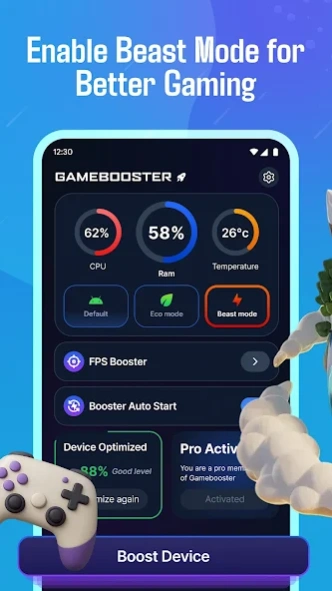


Boost your Games for a smooth & amazing gaming experience.
⭐ Game Booster 4X Plus - Turbo Boost | Unleash True Gamer in you with PLUS version.
No Advertisement!
No Limitations & Unlimited Access!
Do you often find your phone lagging while playing games? No worries from now on as we are coming up with a tool Game Booster 4X Plus - Optimize GFX to optimize your phone for a better gaming experience with Optimize FPS
Game Booster 4X Plus – Turbo Boost is the ultimate tool to enhance games for an unforgettable gaming experience.
Game Booster 4X Plus - Turbo Boost GFX is designed with an intelligent AI optimization system to provide advanced GFX customization and powerful network stabilization. This booster app transforms your smartphone into a true gaming machine when you enable the beast mode. It may enhance games like - PUBG Mobile, Turbo Stars, 3D shooters, racing, Ludo King, or battle royale - our turbo 4X game booster ensures you stay ahead. Game Booster 4X Plus - Turbo Boost GFX delivers the speed and smoothness you’ve been waiting for.
Key Features of Game Booster 4X Plus - Optimize GFX with Turbo Boost -
⚡ Optimize every game with Smart AI Optimization
This game booster plus & 4X Turbo Boost ensures your device delivers lightning-fast frame rates and consistent stability, just like xunyou booster, even during intense gameplay moments. Our advanced AI engine analyzes real-time performance and automatically boosts CPU, GPU, RAM, and network conditions.
🔥 Switch Between DEFAULT, ECO & BEAST Modes in Game Booster Plus - Turbo Boost app:
Enhance your gaming with 4X Turbo Boost with three carefully designed booster just like xunyou booster:
Default Mode -
A balanced mode for general gaming and everyday use. This mode does not make any changes to your phone's default settings.
Eco Mode –
This mode reduces power consumption and is ideal for long gaming sessions without overheating.
Beast Mode –
This mode unlocks maximum device power, it dedicates all the network and battery to your games to provide super clean graphics, this mode blocks internet for some apps so that you can focus exclusiviely on the gameplay as it works in xunyou booster.
🏆 AI-Powered Game Rating & 4X Turbo Boost
Discover which games perform best on your device. Our AI evaluates graphics load and optimization levels to rate popular games. This helps you know exactly which titles your device can run at peak performance and how Game Booster 4X - Turbo Boost improves them & Optimize FPS
Disclaimer -
The Game Booster 4X Plus - Turbo Boost GFX is designed to provide you game optimization rating results which are provided by AI. You may find different results in different devices, and some features may not be available for all phones. This app helps you to check the game optimization ratings only and makes no changes to hardware or phone to enhance the performance. This is an individual app and is not associated with any third party. We do not claim to improve the phone or internet performance.
Why Game Booster - Turbo Boost Uses a VPN Service
Our app uses a local, on-device VPN configuration to power the Internet Blocker feature:
1. The VPN runs only on your device
It does not send your internet traffic to external servers.
2. What the VPN is used for:
To Block internet access for specific apps running in the background to reduce distractions and save data by preventing unwanted background connections
3. No data collection or tracking
We do not collect, store, or transmit any user data, browsing history, or network information.
4. Why a VPN is necessary
Mobile operating systems allow apps to manage and filter network traffic only through a VPN configuration. To block background internet access safely and effectively, using a local VPN is the standard and secure method.
Privacy Policy -
https://quantum4u.in/web/gameboosterpro/privacy-policy
About Game Booster 4X Plus
The company that develops Game Booster 4X Plus is Quantum4u. The latest version released by its developer is 1.0 .
To install Game Booster 4X Plus on your Android device, just click the green Continue To App button above to start the installation process. The app is listed on our website since 2025-12-24 and was downloaded 44 times. We have already checked if the download link is safe, however for your own protection we recommend that you scan the downloaded app with your antivirus. Your antivirus may detect the Game Booster 4X Plus as malware as malware if the download link to app.quantum.supdate_pro is broken.
How to install Game Booster 4X Plus on your Android device:
- Click on the Continue To App button on our website. This will redirect you to Google Play.
- Once the Game Booster 4X Plus is shown in the Google Play listing of your Android device, you can start its download and installation. Tap on the Install button located below the search bar and to the right of the app icon.
- A pop-up window with the permissions required by Game Booster 4X Plus will be shown. Click on Accept to continue the process.
- Game Booster 4X Plus will be downloaded onto your device, displaying a progress. Once the download completes, the installation will start and you'll get a notification after the installation is finished.
